Read a loot table in players, not percentages.
Drop rates turns weights into what players live: the odds within 10, 50 or 100 pulls, the pull by which nine in ten have an item, and what a pity rule changes. Plus balancing formulas, live charts and a feed to your engine.
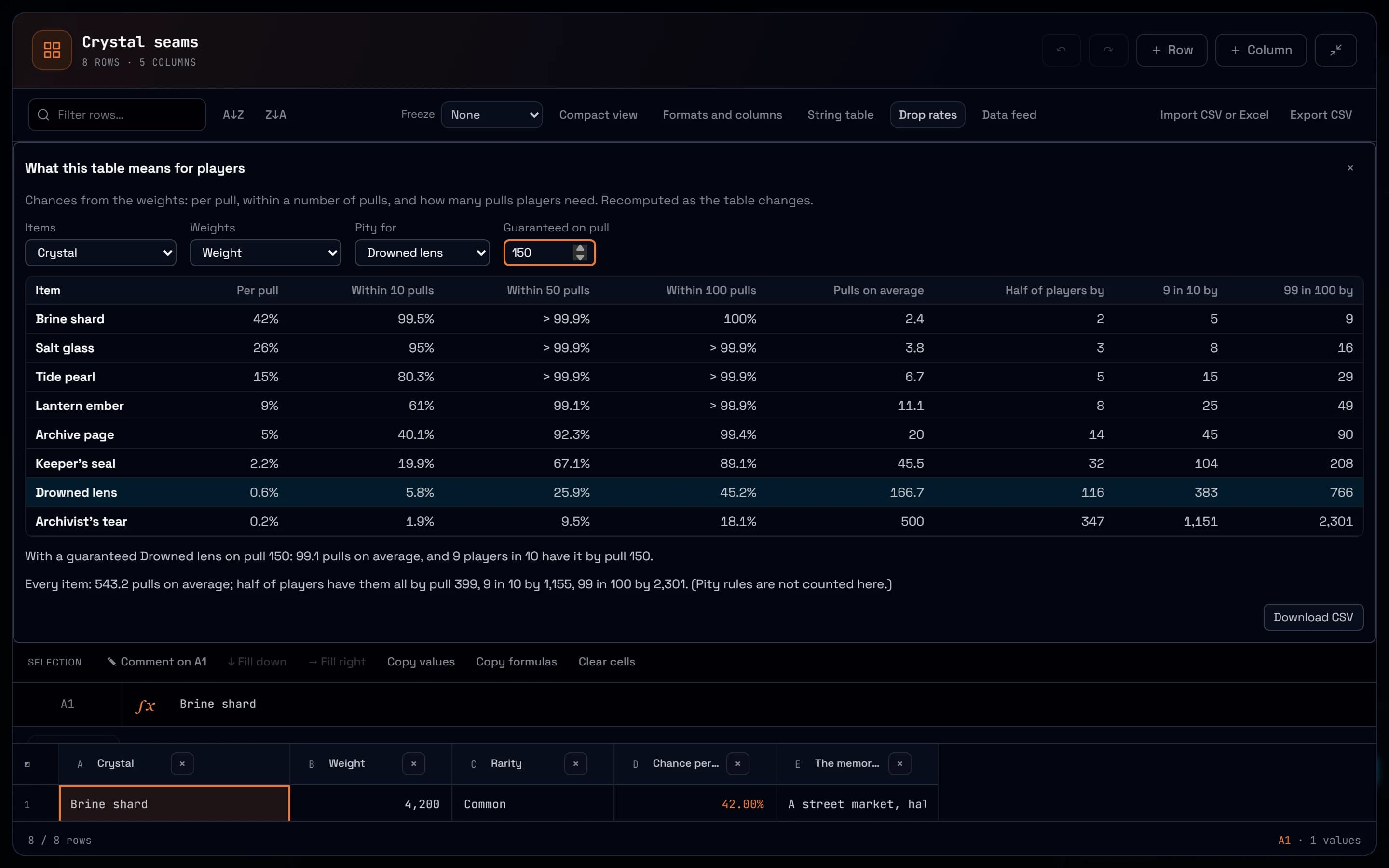
A loot table is a column of weights. What a designer needs to know is what those weights do to players: how long the rare drop takes, and for how many of them. The spreadsheet now answers that, beside the formulas, curves and notes of the rest of the balance pass.
What a loot table means for players
Press Drop rates on a sheet with items and weights. For each item the panel gives its chance per pull and within 10, 50 and 100 pulls, the pulls on average, and the pull by which half, nine in ten and 99 in 100 players have it. Add a pity rule to see what a guarantee changes: on the Saltmarrow crystal seams, the Drowned lens is guaranteed on pull 150. A last line says how long collecting the whole table takes. Weights computed by formulas count, the panel follows every change, and the results download as CSV.
The maths of a balance pass
Formulas gain the functions of curves and odds: POWER, MOD, FLOOR and CEILING for a cost curve, SUMPRODUCT, MEDIAN, STDEV and PERCENTILE for a reward table, COMBIN and FACT for odds, with Excel’s spellings such as STDEV.S and CEILING.MATH. VLOOKUP, XLOOKUP, INDEX and MATCH look values up, COUNTIF and SUMIF and their IFS forms count and total by condition, and a formula reads another sheet of the same document by name, as in 'Loot table'!A1:C9. An imported Excel workbook keeps these formulas live instead of their saved results.
Curves you can see, notes that stay put
A Chart block draws a range of a sheet as a line, bars, an area or points, and redraws when the numbers change, so an XP curve is tuned by looking at it. A comment can sit on one cell, such as the neap crystals in the harvest economy, and it stays on that cell when rows are sorted or moved. A blank sheet can start as a loot table or an XP curve that already computes.
Straight to the engine
A data key reads a sheet’s computed values as JSON or CSV at a fixed address, so a build script or the game fetches them over HTTPS. Any member creates one in their profile, for the whole workspace or one project. It only reads, does not need the MCP add-on, and an unchanged sheet answers 304 with no body.
Try it in your workflow
- Open the loot table example.
- Press Drop rates.
- Under Pity for, choose the Crown of the first king and guarantee it on pull 90.
- Change a drop weight in the sheet and watch the panel follow.
The pity rule is a hard guarantee on one item: soft pity, where the odds rise with each pull, and draws without replacement are not modelled, and the estimate for collecting everything leaves pity aside. Collecting them all is exact up to 12 items, then simulated from a fixed seed. Formulas and charts read the sheets of their own document only, there are no macros or pivot tables, and a data key makes up to 120 requests a minute.

