Find what’s overdue, and sort it out from the map.
Filter the map to what is overdue, due this week or yours, colour it by due date, then set the assignee, status, due date and tags of many documents at once, each change with its Undo.
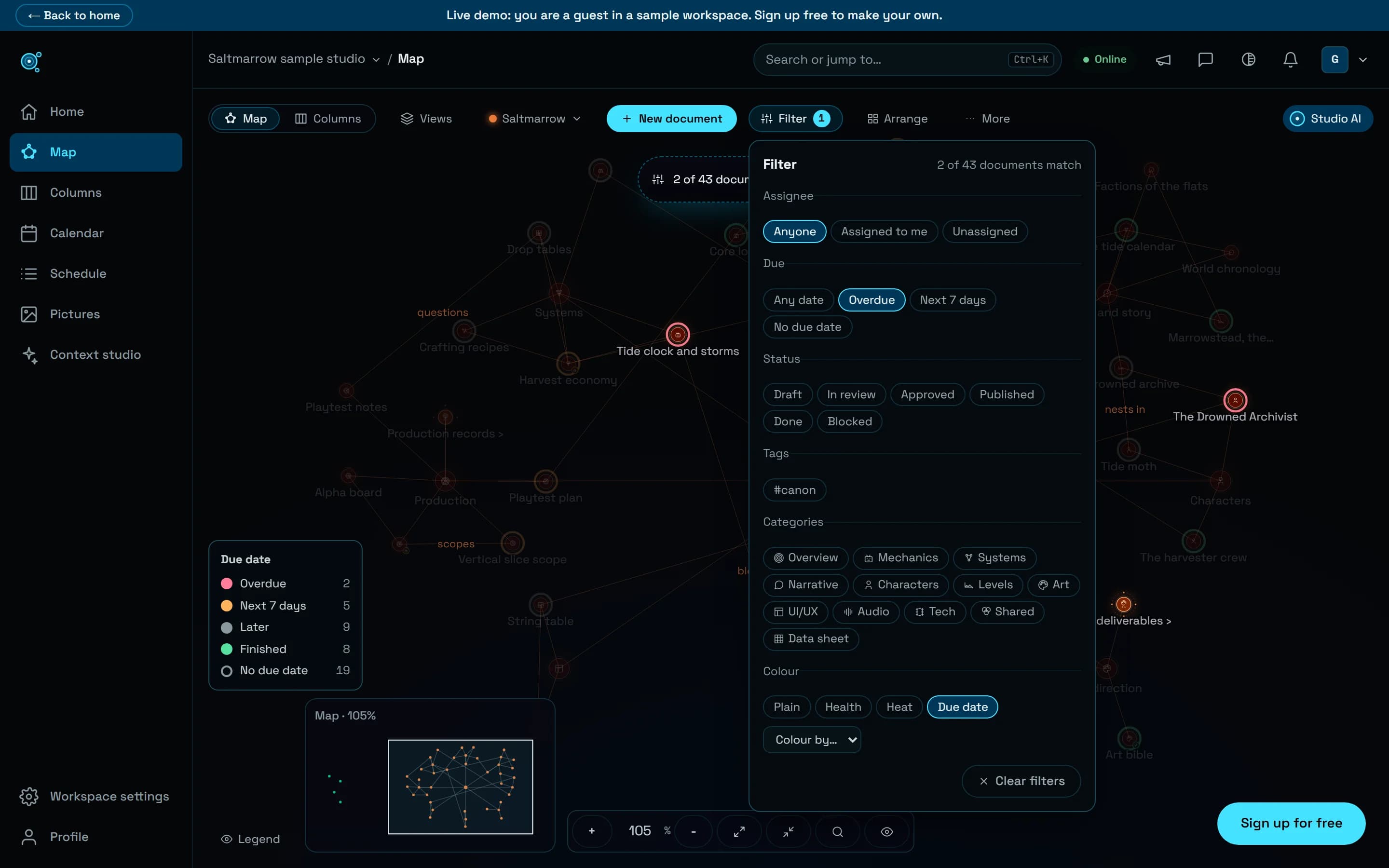
What is late, and who has it? The map could not say: names were drawn about 6 pixels tall, a star you clicked ended up under the panels it opened, and changing five documents meant five trips to the editor. The map answers now, and the calendar and the schedule count late work the same way.
What is late, in two clicks
Filter, in the map’s toolbar, shows only what you ask for: assigned to you or to nobody, overdue, due in the next 7 days or without a due date, by status, tag and category, and says how many documents match. The Due date colour paints each star by when it is due, with a legend that counts each group, and your filters are kept in your saved views. Names stay 12 pixels tall at any zoom without covering each other, and every command of the toolbar fits on screen.
Many documents in one go
A click on a star opens its inspector, where you set its assignee, status, due date and tags without opening the editor, and the view moves the star out from under the panels. Shift+click or Shift+drag selects several, and the selection bar groups them into a new folder, moves them, sets a due date or a status, assigns them, adds tags, links them in order or deletes them. Add tags now adds to each document’s tags, where it used to replace them. Grouping three documents into a new folder takes five clicks and a title, against ten and a drag; giving five documents an assignee and a due date, about 13 clicks against about 38.
Every change can be undone
Moves, links, bulk changes and arrangements say what they did once saved, with Undo. A deleted selection comes back with its content, comments and history for 30 days. Share, on the map, copies the document’s existing read-only link, or makes one that lasts 30 days, with Manage links beside it. In Columns, drag rows onto a folder, select several, rename with F2 or choose Move to…, and undo that too.
One rule for late
A document is late when its due date has passed and it is not done, published or approved, counted from your own day. The map, the calendar, the schedule and live views all use that rule, so they give the same number where they used to disagree. On a phone, the map’s tools sit in one sheet and the map opens on the project’s heart star.
Try it in your workflow
- Open your map, choose Filter, then Overdue.
- Set the colour to Due date to see what comes next.
- Shift+click the late documents and choose Assign to… or Due date… in the selection bar.
- Changed your mind? Press Undo in the notice.
In the live demo you can filter and colour the map, not change it. Tags added to a selection are merged in your browser, so two people tagging the same documents at the same moment can still get in each other’s way, and Undo puts back the tags as they were before, even if a teammate has changed them since. A link shared from the map lasts 30 days unless the document already had one.

