Studio AI answers sooner, and questions cost fewer Comets. Uploads say why.
A plain question now goes to a lighter model and costs a fraction of the Comets, answers start sooner, and a change you ask for in any of the 12 languages is made without a back-and-forth. A refused file says why, with its numbers.
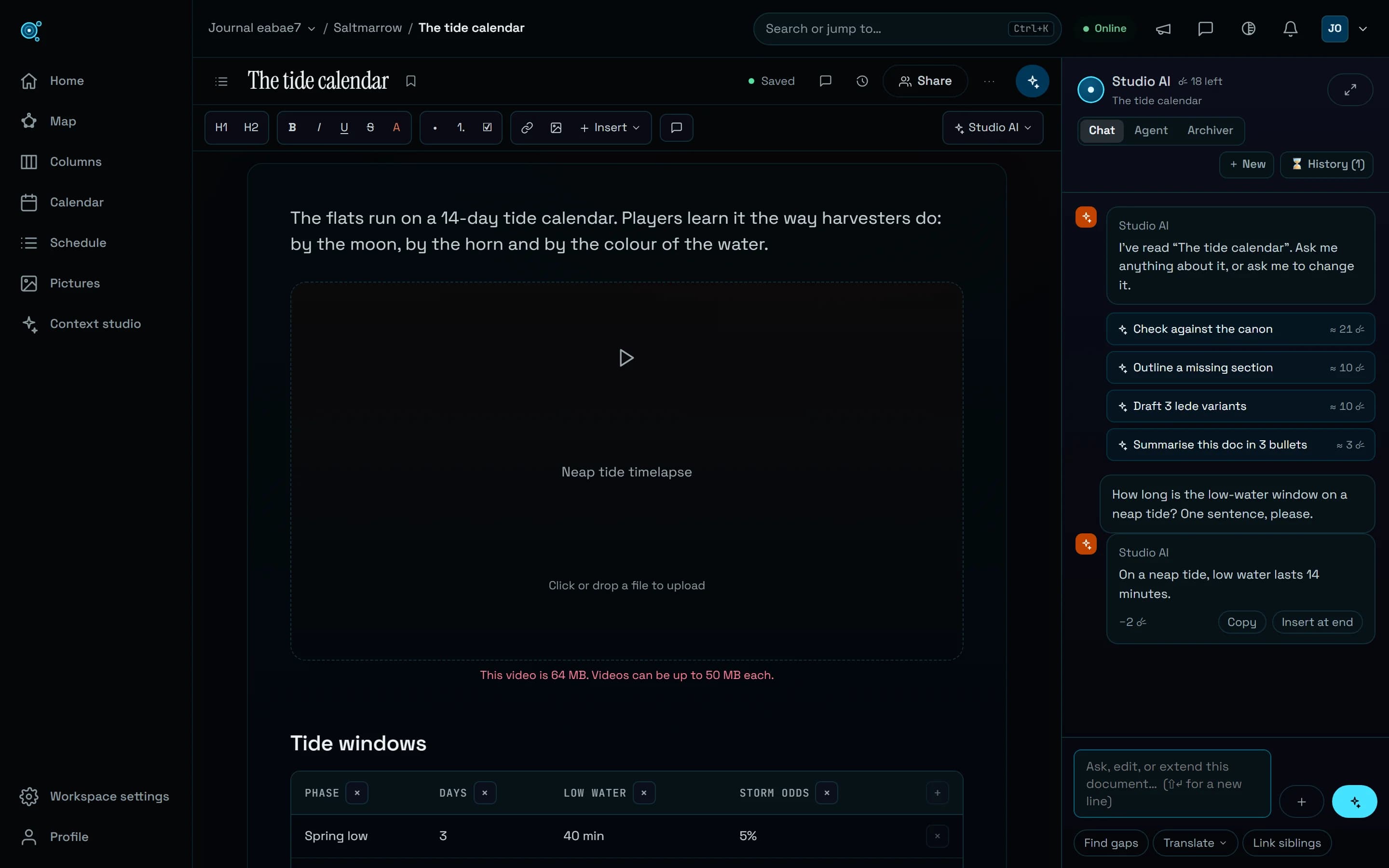
Every request to Studio AI used to go to the same large model with the same long instructions, so even a one-line question cost about 9 ☄. A question asked soon after another could also wait several seconds for its first word. Uploads had a dead end of their own: a file that was too large, or of a type its place does not take, was refused with one sentence that named neither. All three have changed.
Questions go to a lighter model
A question you ask in Chat, about the open document or the project, is now answered by a lighter model that can only read. Measured on a short document, a plain question cost about 1.6 ☄, where it cost about 9.1 ☄ before. Studio AI sends a request there only when it is plainly a question and asks for nothing to change. Everything else, from a rewrite to an Agent or Archiver run, still goes to the larger model, the one that writes.
Ask for a change, and it is made
A request to write or change something is now recognised in each of the app’s 12 languages, from Spanish to Chinese, and goes straight to the model that writes. Ask Studio AI to rewrite the introduction and it rewrites it, instead of first asking which direction you would like, then says in a sentence or two what it changed and that you can undo it. Should a request the lighter model receives turn out to ask for a change, it hands it to the writing model within the same answer: you see one reply and have nothing to press. Say not to change anything, in any of those languages, and nothing is changed: Studio AI answers, or describes the change, with Do it to make it after all.
First words in a second or two
After each answer, the service behind Studio AI stayed busy for 20 more seconds, so a question asked soon after found it occupied and waited for a fresh start. On 18 October we measured 5 to 8 seconds before the model was even asked, and 8 to 20 seconds in all. It now lets go within two seconds. With the pause it takes to read an answer and type the next question, the first words now arrive in about one to two seconds.
Uploads that say why
A refused file now names the cause with its numbers, in the language you use Nodary in, and, when the file itself is the reason, before anything is sent: “This video is 64 MB. Videos can be up to 50 MB each.” A type its place does not take is named, with the ones it does take: a .heic photo dropped on a picture block is refused, with a reminder that pictures can be PNG, JPEG, GIF, WebP or AVIF. A full workspace says how much of its storage is used and how large the file is, then what you can do, which depends on your plan and your role. A lost connection, a transfer that stalls for 45 seconds and a problem on Nodary’s side each say so, and Retry is only offered when the same file could get through. Agents connected over MCP read the same reasons, in English.
A picture is taken for what it is
Nodary now reads the first bytes of a picture before sending it. A picture saved under another picture’s extension, such as a WebP named .jpg by Save image as, goes through and is stored as what it really is. A HEIC named .jpg is refused as a HEIC, and a file named like a picture that holds no picture is refused with a message saying its name says .png but its content is not a picture of that kind. Pictures pasted or dropped together are each handled on their own: those that fit are placed, the refused ones are listed with their reasons, the first three by name and then how many more, and on a board the pictures beyond 12 at once are counted instead of silently left out.
Try it in your workflow
- Open a document and open Studio AI beside it, in Chat.
- Ask a plain question about the document, then look under the answer: the Comets it used are shown there.
- Ask for a change in your own language, such as rewriting the introduction more directly: Studio AI makes it and says what it changed.
- Pick a video over 50 MB, or a HEIC photo, for a video or picture block: the block says why it cannot take it, before anything is sent.
The figures were measured on a short document in October 2026: a longer document, a long conversation or a long answer costs more, and the cost under an answer is rounded to a whole Comet. Only a plain question asked in Chat goes to the lighter model. Requests that write or change something, and every Agent or Archiver run, still use the larger model and cost about what they did, a little more when Studio AI has been quiet for a few minutes; a question handed over to it also counts the lighter model’s short first round. The first request after a long quiet spell can take a few seconds longer to start. Studio AI is counted in Comets (☄), never in money. The link opens the plans, with the Comets each one includes.

