Draw the feedback on the picture. Send it as one sheet.
Circle, box or point at what to change on a picture, keep every version to compare and restore, and send your outsourcer one printable sheet with the notes drawn on each image.
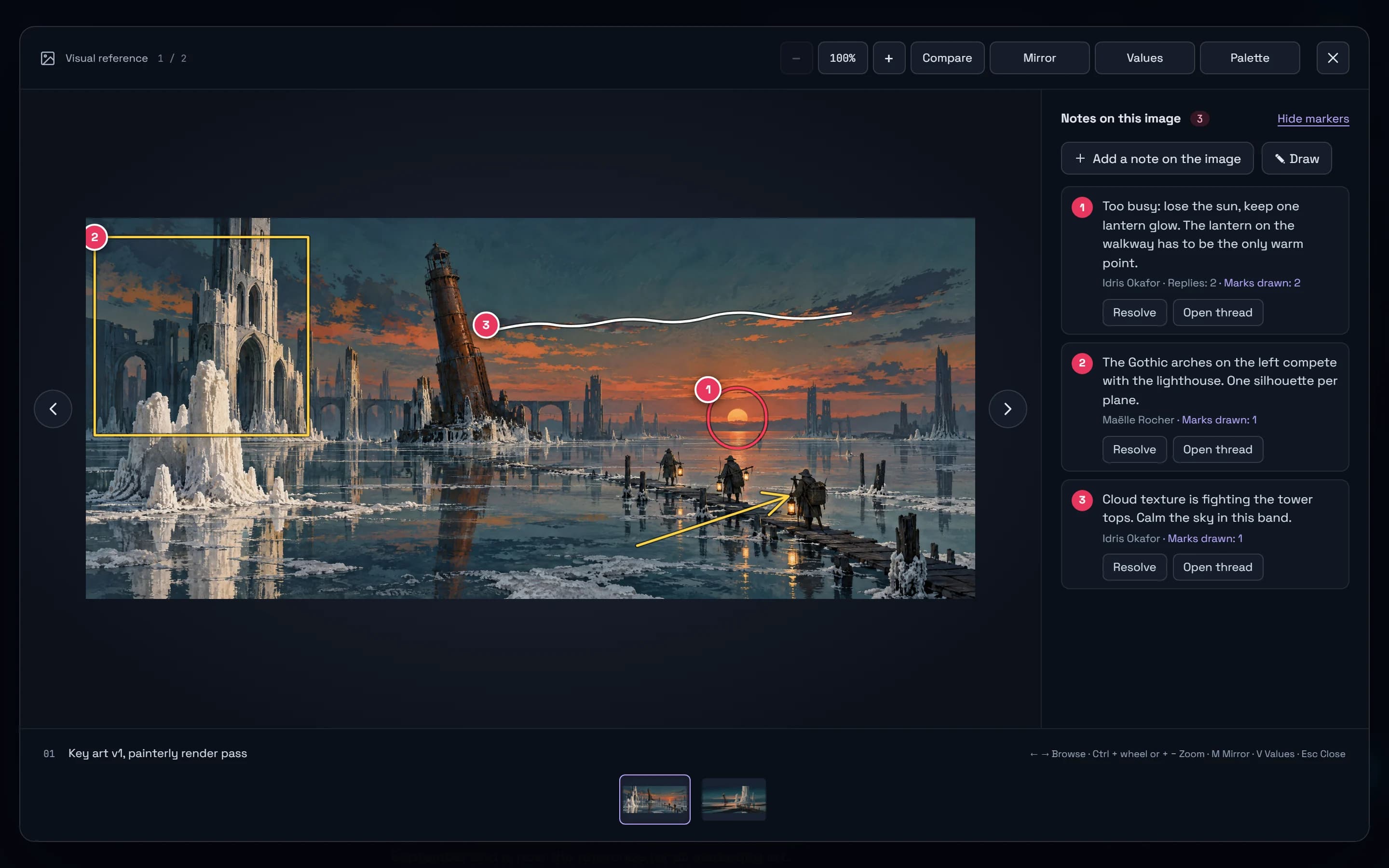
An art note points at a place: this sun, those arches, that lantern. Until now you had to describe the place in words. Notes now sit on the picture itself, drawn where they apply, and they follow the picture through its versions to the sheet you send your outsourcer.
Draw the note where it applies
In the image viewer, Add a note on the image pins a numbered marker where you click. Draw goes further, with a circle, an arrow, a pen and a box in five colours: the first stroke opens the note it belongs to, so you draw, then write. On key art v1 of the Saltmarrow sample, one note circles the sun and points an arrow at the one lantern that should stay warm, another boxes the Gothic arches, and a third runs a line across the clouds. From the keyboard, the arrow keys move a cursor and Enter places a circle, a box or each end of an arrow. An agent connected over MCP sees these marks when it looks at the picture, and can draw its own.
Every version kept, compared and restored
Replacing a picture now keeps the earlier file as a version, up to 12 per picture, behind a v3 badge. Compare a version with the current one using a divider you drag, or side by side, then restore it: the file it replaces becomes a version in turn, so nothing is lost. Notes stay on the version they were written on. The viewer also zooms from 100 to 400% where you point, pans, and compares two pictures of the same moodboard or gallery. A concept can name the picture it comes from, painted over it, after it, as a variant or as an iteration, and you compare the two the same way.
One feedback sheet for the outsourcer
From the Pictures page or the export menu, a document’s feedback sheet lists every picture that has feedback: its open notes, numbered and drawn as in the viewer, the replies, and the decision with what to rework, who decided and when. Print it or save it as a PDF from your browser. It lays out on A4, never splits a picture across two pages, and stays light whatever your theme. Resolved notes leave the sheet while the others keep their numbers, so note 3 is still note 3 when the outsourcer writes back.
Notes on a moment, and on a point of a model
The same review reaches the rest of a production. A note on a video or a sound sits at its moment, such as 0:12, and choosing it pauses the clip there; a sound shows its waveform under its notes. A glTF model opens in a 3D view where a note pins to a point of its surface and brings the camera back to the angle it was written from.
Try it in your workflow
- Open a picture in a moodboard, a gallery or an image block, and choose Draw.
- Circle what should change, then write the note that opens.
- Replace the picture with the next pass and compare the two versions with the divider.
- On the Pictures page, open the document’s feedback sheet and save it as a PDF.
The feedback sheet goes out as a PDF: there is no PowerPoint version yet, and no delivery link where someone without an account reads feedback and uploads new versions. You cannot draw on a frame of a video yet. The pictures you draw on are PNG, JPEG, GIF, WebP or AVIF files up to 50 MB; a .psd is attached as a file. Drawing a note needs an account; the example link opens the key art reviews of Saltmarrow, a fictional sample project, in the live demo, where the art director’s notes on the first pass can be read.

