Bring in a whole folder of notes, and see it first.
Import a folder of Markdown or a ZIP, a Nodary archive included: preview the tree, choose what happens to documents that already exist, and know before you start whether it fits your plan.
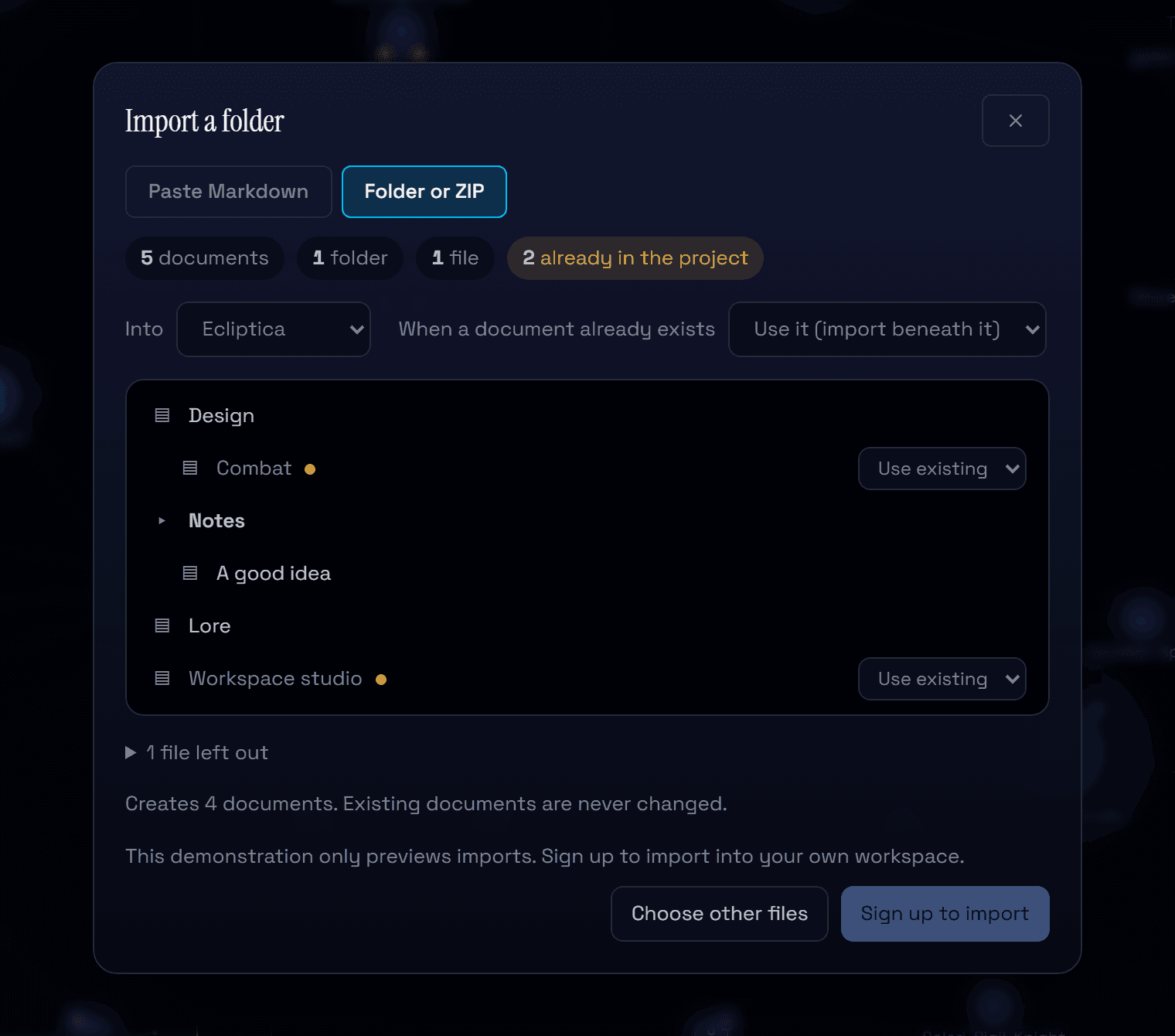
Notes often start somewhere else: a folder of Markdown files, a vault from another tool, an archive exported from Nodary. Import used to take one pasted document at a time. It now takes the whole folder, shows you what it will do, and never touches what you already have.
See the tree before anything is created
Drop a folder or a ZIP, or choose one. Markdown files become documents; a folder next to a document of the same name becomes that document's children, and other folders become folders of their own. Titles come from the file's front matter, then its first heading, then its name. Files that are neither documents nor images are listed and left out.
Duplicates, settled your way
Documents whose title already exists in the project are marked. By default the existing document is used and what the folder places beneath it is imported under it; you can keep both instead, and the new one gets a numbered title. Nothing that already exists is modified. Before you start, the preview says how many documents the import creates and whether your plan has room for them.
Links and images come along
Links between the imported files point to the new documents, including links to a heading. Images placed next to the notes are uploaded and shown in their documents. A Nodary archive is restored from its structured copy, with its diagrams, boards and spreadsheets exactly as they were. Front matter, image lines and relative links are also understood when you paste a single document.
Try it in your workflow
- Open the demonstration, choose Import, then Folder or ZIP.
- Export the Ecliptica project first if you want an archive to try.
- Choose the archive or a folder of Markdown files and look at the tree.
- Change a duplicate to Keep both and watch the number of documents to create.
Up to 200 documents and 300 images per import, 2 MB of text per document and 50 MB per file; ZIPs up to 300 MB. Imports run from your browser and pause briefly between documents so large folders never trip the service's limits. If the plan limit is reached during an import, the documents already created keep their content and the rest is reported. The demonstration shows the preview only: importing needs an account.

