Nodary for agencies and the work you do for clients.
Each client gets a project: the brief, the references, the deliverables with their owners and dates, the reviews and the handoff, linked on one map. Clients read through share links you can revoke, your team decides with signed reviews, and the whole project exports when the engagement ends.

The problem, in your team’s words
Agency work is a stream of briefs, revisions and approvals across several clients at once. The brief is in an email, the latest feedback was given in a call, and the approved version sits in a shared drive next to four files named final. When a client asks why something changed, rebuilding the answer takes an afternoon, and the next kickoff starts from an empty folder again.
- Which version did the client sign off?
- The brief changed in a call and nobody wrote it down.
- We rebuild the same kickoff folder for every client.
A week with Nodary
How a week can go once the work lives in Nodary. Each day uses something the product does today.
- Monday
Open a project for the client
Create a project for the client and start its heart document from the Project Brief template: objective, scope in and out, milestones, stakeholders. Invite your team by email or by a link valid 14 days, straight into the project, and save your kickoff pages as templates so the next client starts from your process, not from a blank page.
Project brief templates for client work - Tuesday
Plan the deliverables
Give each deliverable an owner, a status and a due date, then see them on the calendar and the schedule, where you drag a card to another day. A live board groups the client’s work by status, and the progress view says whether the milestone lands by its date, with the late work listed first.
Project planning on documents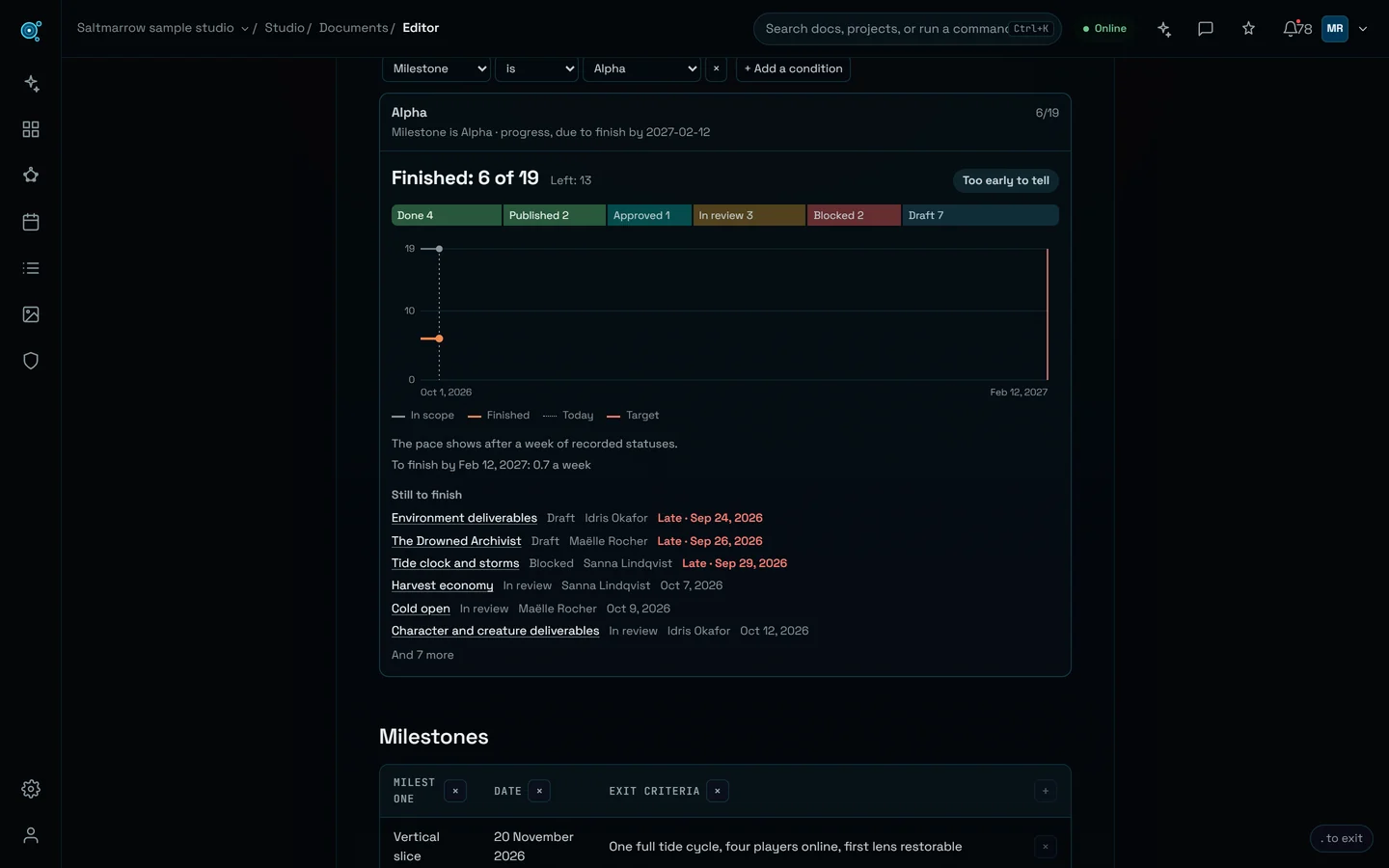
- Wednesday
Review inside the team, with signed decisions
Ask a workspace owner or admin, or a project admin, to review a deliverable before it goes out; they approve it or send it back with a note, signed with who and when. On visual work, circle or point at what should change on the picture itself, and approve, send back or reject each version from the keyboard.
Reviews and approvals for client deliverables - Thursday
Show the client
Share a document, a document with everything under it, or the whole workspace as a read-only link for the days you choose, and revoke it at any time. In a call, present a board frame by frame from the keyboard; after it, print a document to PDF from a real page preview, or send a feedback sheet with every note drawn on the work.
Boards and moodboards to present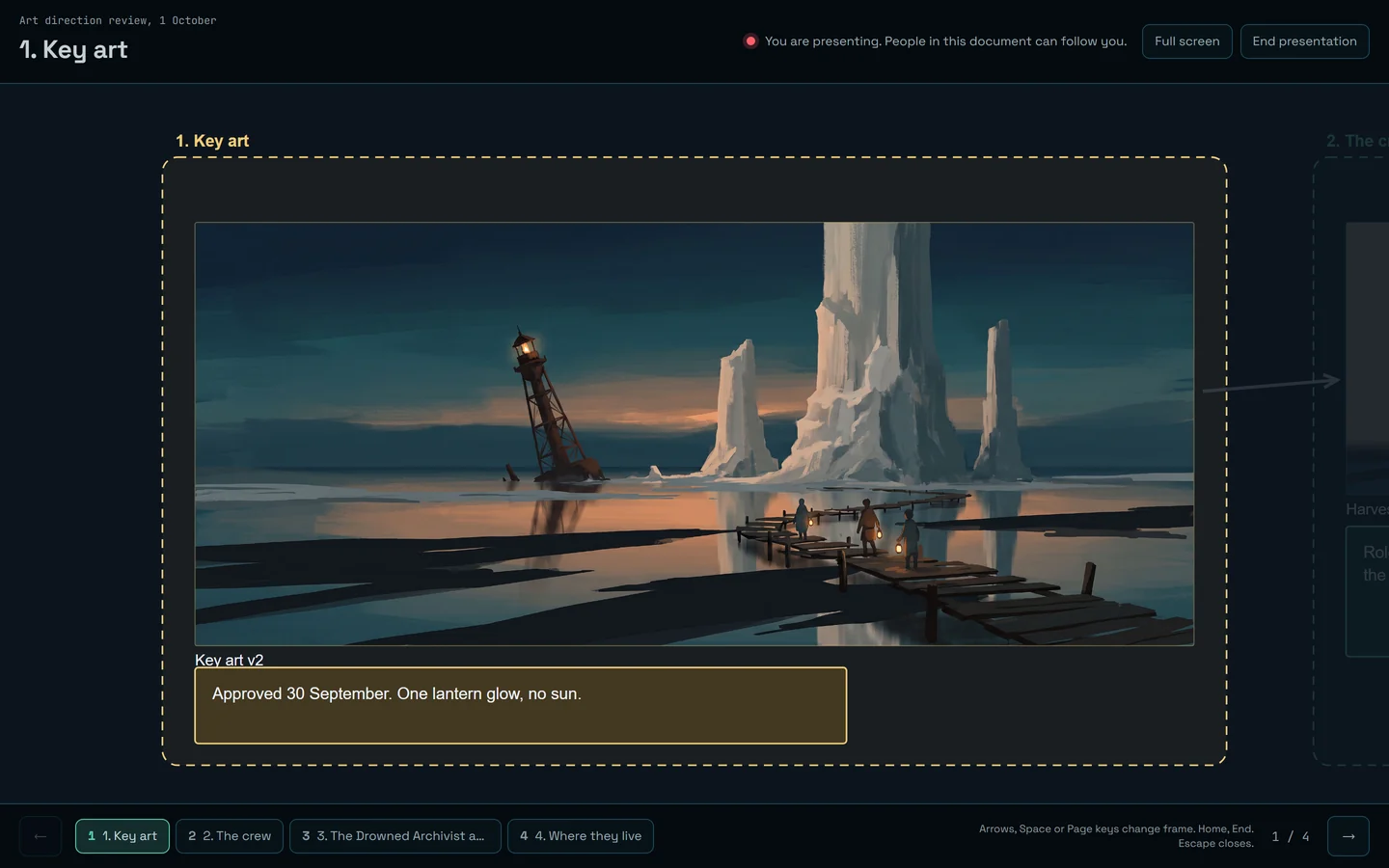
- Friday
Hand over and close the engagement
Export the project as a .zip: every document in Markdown with its files, editable sources for diagrams, boards and sheets, and links that work offline. Export a document as an editable PowerPoint for the client’s own deck, or keep the project in the workspace for the next phase of work.
A knowledge base that stays portable


A template to start from
Project Brief
Every client project starts from the same questions. Project Brief, one of the 30 built-in templates in 12 languages, asks them on one page; adapt it once to your agency’s process and save it as your own template for every new client.
- The objective, so every review asks the same question
- Scope in and out, to settle scope creep in writing
- Milestones and stakeholders, with the owner and the reviewers named
Three requests for your AI agent
An agent connected over MCP prepares the routine parts of client work in your name: kickoff documents, due dates across a schedule, a list of what is late. It cannot share a link, invite a member or delete a project: those stay human decisions.
Connect an agentYou askCreate a kickoff folder for the Atlas client from the Project Brief and Milestone Plan templates, and date the milestones from the brief.
create_clustercreate_from_templateset_due_dates
You askList every Atlas deliverable that is late or waiting for a review, with its owner.
list_stars
You askSummarise what changed in the Atlas brief since the version the client approved.
list_versionsdiff_versions
What Nodary does not do
- No client portal and no guest accounts: a client reads through a share link with no account, and joins as a member, taking a seat, to comment.
- No time tracking, invoicing or resource planning.
- No custom domain or white label for share links.
- Notifications go to members only; review decisions can also be posted to a Slack or Discord channel of your own.
- No single sign-on (SSO) yet.
The right plan
Studio
€29 per seat per month, billed monthly
For teams running real projects.
Studio fits an agency with several clients: unlimited members and projects, and each client’s project kept to the people added to it. A freelancer or a small team can run a few clients on Pro.
- Unlimited members, projects and documents
- 50 GB of files, and more in blocks of 50 GB at €10 a month each
- Studio AI: 1,500 ☄ per seat each month, shared by the team
- MCP included for every member
Questions
Can clients see their project without an account?
Yes, through a read-only share link: a document, a document with everything under it, or the whole workspace, for the days you set or with no end, revocable at any time. A client who should comment joins the workspace as a member and takes a seat; on Studio you can keep them to their own project.
Can we keep clients from seeing each other’s work?
Yes. On Studio, keep each client’s project to the people added to it, each with a role there, and limit members to the projects they are added to. A share link opens only what it was made for.
What happens to a project when the engagement ends?
Export it whole as a .zip with every document, its files and links that work offline, or leave it in the workspace for the next phase. Deleting a project stays a human decision, and a deleted document can be restored for 30 days with its history.
Can a client approve a deliverable in Nodary?
Review decisions are recorded by an owner or admin of the workspace or an admin of the project, signed with who and when. When a client approves by email or in a call, record the decision on the document with a note saying where it came from, so the history shows it.
Can we reuse our process for every client?
Yes: save any document as a template, start from the 30 built-in ones, and ask an agent to create a new client’s kickoff documents in one call. An agent can create up to 25 documents in a single request.
One project per client, nothing lost between them.
Start free with your next client, or open the sample project in the demo to see two versions of a key art with their signed decisions: no account needed.
Free for two members and ten documents. No card.