Sign-in alerts, backup codes, keys that warn first.
An email when a new device signs in, backup codes you can count and renew, API keys that warn before they end, and display settings that now apply.
Two-step verification came with backup codes nobody could count or renew, a sign-in from a new device went unnoticed, and an API key simply stopped working on the day it ended, with a bare Unauthorized. Two display settings in the Profile were saved and never applied. This release closes those gaps.
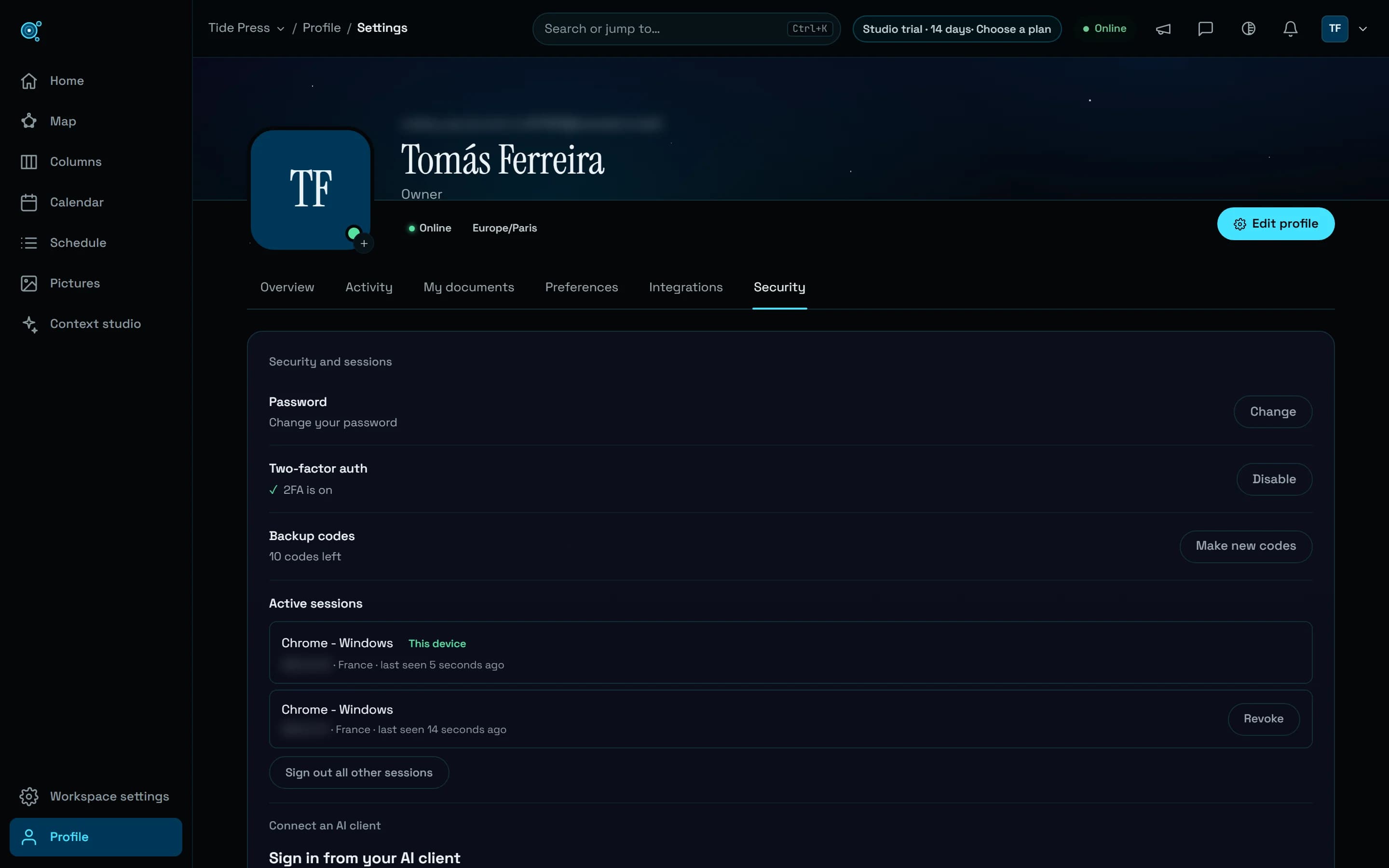
Backup codes you can count
In Profile, Security, two-step verification now shows how many backup codes are left, 10 codes left, and warns when two or fewer remain. Make new codes replaces them with ten new ones, shown once; the old ones stop working at that moment, and you confirm your password first if you signed in more than ten minutes ago. An email tells you when new codes are made, and another when a backup code is used to sign in, with how many are left.
A new device signs in, you hear of it
When your account signs in from a browser, a system or a country it has not used in the last twelve months, you get an email with the device, the approximate place and the time, in your language and your time zone. Its button, This wasn’t me, opens your sessions, where you sign out everywhere. Your very first sign-in sends nothing, and three such emails go out a day at most. The sessions list now shows each session’s approximate country.
Keys that warn before they end
An API key with an end date now emails its owner 14 days and one day before it ends. A key that has ended is refused with the date it ended, rather than a bare Unauthorized, so whoever runs the integration knows what happened. Replace, beside each key, makes a new key with the same name, access and lifetime, shown once; the old one keeps working until you revoke it, so nothing breaks while you swap them.
When your teammates were last here
Workspace owners and admins now see a Last active column in Workspace settings, Members: today, yesterday or a number of days, never a time. It counts use of the app, not of agents, and nobody else sees it. An owner’s or an admin’s agent reads the same with list_members. The privacy policy says so.
Display settings that apply
Editor font and Density, in Preferences, were saved and did nothing. Editor font now sets the font of your documents in the editor, Nodary’s font, a serif, JetBrains Mono or your device’s own, and Density tightens or opens up the editor’s lines and blocks, Home’s rows, notifications and lists: Comfortable, Compact or Spacious. The reader keeps its own choice of font.
Integrations that say what works
Profile, Integrations now starts with what works today, each with its way in: AI assistants over MCP, Slack and Discord, Import and Data feed. What is planned follows as a plain list, with nothing to click.
Try it in your workflow
- Open Profile, Security: with two-step verification on, see how many backup codes are left.
- Choose Make new codes and keep the ten new ones somewhere safe.
- Beside an API key, choose Replace, put the new key where the old one was used, then revoke the old one.
- In Preferences, choose an Editor font and a Density, then open a document.
A new-device alert knows a device by its browser, its system and its country: a sign-in from your usual browser in your usual country is not flagged, while a new browser or a trip abroad is. An address that gives no country, such as an IPv6 address, matches only another one without a country. Backup codes come with two-step verification. Last active starts counting from this release. The link opens Nodary’s security page.